Does Adding a WiFi Extender Really Steal Half Your Speed? The Answer Is More Complicated Than You Think
There's a piece of conventional wisdom floating around tech forums, Reddit threads, and YouTube comment sections that goes something like this: add a WiFi extender and you automatically lose half your speed. It gets repeated so often that a lot of people just accept it as fact before they've even plugged anything in.
Here's the truth: sometimes it's accurate. Sometimes it's wildly off. And the difference between those two outcomes has everything to do with how your extender handles something called backhaul — and very little to do with how many devices you've connected.
Let's break it down.
Where the "Half Speed" Idea Actually Comes From
The concern isn't totally made up. It's rooted in how single-band repeaters work — and for a long time, single-band was the default for budget extenders.
A single-band repeater operates entirely on one radio frequency, typically 2.4 GHz. That single channel has to do two jobs simultaneously: receive the signal coming in from your router and rebroadcast it to your devices. Since those two tasks share the same airtime, the extender can only dedicate roughly half its capacity to each direction of traffic. The result is a real, measurable speed hit — often landing somewhere between 45% and 55% of what you'd see connected directly to your router.
So yes, on a single-band extender, the "half speed" rule is a reasonable ballpark. But that's where the straightforward part ends.
Dual-Band Extenders Change the Math Entirely
Most extenders sold in the US today are dual-band, meaning they operate on both 2.4 GHz and 5 GHz simultaneously. This matters a lot because it opens the door to something called a dedicated backhaul channel.
Here's how it works in practice: a properly configured dual-band extender can use the 5 GHz band exclusively to communicate with your router (that's the backhaul link), while simultaneously using the 2.4 GHz band to serve your devices. Because those two tasks are happening on separate frequencies, they don't compete for the same airtime.
The practical result? You can connect a laptop in your back bedroom and see speeds that are genuinely close to what your router puts out — not some halved, degraded version of it. The penalty isn't zero, but it's nothing like what you'd experience on a single-band device.
The catch is that not every dual-band extender automatically splits channels this way. Some cheaper models still operate both bands in a shared mode. Always check the spec sheet for language like "dedicated backhaul" or "dual-band concurrent" before assuming you're getting the full benefit.
The Variable Nobody Mentions: Your Neighbors
Here's where things get genuinely interesting — and where a lot of extender performance problems actually originate.
WiFi networks share spectrum. In a dense apartment building or a suburban neighborhood where houses sit close together, your 2.4 GHz band might be competing with a dozen other networks broadcasting on overlapping channels. This is called co-channel interference, and it's one of the most underappreciated causes of slow extender performance in the US.
The 2.4 GHz band only has three non-overlapping channels (1, 6, and 11). If your neighbor's router is sitting on the same channel as your extender's backhaul link, they're effectively sharing airtime with you — and neither of you asked for that arrangement. The result looks exactly like bandwidth loss, but it has nothing to do with your hardware's architecture.
5 GHz is less crowded, which is another reason why a dual-band extender that uses 5 GHz for backhaul tends to perform better in dense environments. There are more non-overlapping channels available, and most neighbors' older devices are still camping out on 2.4 GHz anyway.
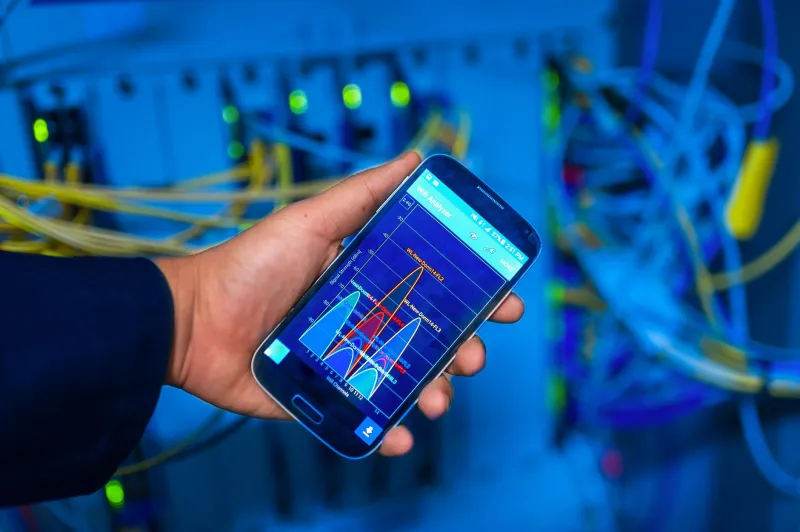
Before you blame your extender for slow speeds, it's worth downloading a free WiFi analyzer app — there are solid options for both Android and iPhone — and checking what channels your neighbors are using. If you're stacked on top of three other networks, switching your extender's channel manually can make a noticeable difference without spending a dollar.
How to Predict Real-World Speed Loss Before You Buy
If you want a rough sense of what you're actually signing up for before purchasing, here's a practical framework:
Single-band extender in a low-interference environment: Expect roughly 40–50% of your router's speed at the extender's location. Consistent, predictable, and honestly fine for light browsing or streaming standard definition video.
Single-band extender in a crowded apartment building: Performance gets harder to predict. Co-channel interference can push effective speeds well below that 50% mark, especially during peak evening hours when everyone's streaming.
Dual-band extender with dedicated backhaul, low interference: You can realistically expect 70–85% of your router's throughput at the client device, depending on signal strength between the router and extender. This is the scenario where the "half speed" myth falls completely flat.
Dual-band extender with dedicated backhaul, high interference on 5 GHz: Still better than single-band, but the advantage narrows. Dense urban environments with lots of modern 5 GHz networks nearby can chip away at that backhaul channel quality.
The single biggest variable in all of these scenarios isn't the number of devices you've connected — it's the signal quality between your router and the extender itself. An extender placed right at the edge of your router's range is going to perform worse than one placed closer in, regardless of what band it's using.
What This Means When You're Shopping
The "half speed" concern is worth taking seriously, but it shouldn't automatically push you toward the most expensive option on the shelf. A mid-range dual-band extender placed thoughtfully — somewhere in the middle third of the distance between your router and your dead zone — will outperform a premium single-band unit shoved in the far corner of your house.
Look for these things specifically:
- Dual-band with concurrent operation — not just dual-band capable, but actually running both bands at the same time
- Dedicated backhaul channel mentioned explicitly in the product description
- 5 GHz backhaul support if you live somewhere with a lot of neighboring networks
- MU-MIMO support if you're connecting multiple devices simultaneously, since this lets the extender handle several streams at once rather than queuing them
And if you're already dealing with slow extender speeds and you're not sure whether your hardware or your neighbors are to blame, run that channel scan first. It takes five minutes and might save you from buying new equipment you don't actually need.
The Bottom Line
The bandwidth-halving myth isn't completely wrong — it's just stuck in 2015. For single-band hardware in a crowded RF environment, it's actually an optimistic estimate. For a modern dual-band extender with a clean backhaul channel, it dramatically overstates the penalty you'll actually pay.
The real lesson here is that "how much speed will I lose?" is the wrong question to start with. The better question is: what's between my router and my extender, and what's between my extender and my devices? Answer those two things honestly and you'll have a much clearer picture of what to expect — before a single cable gets unplugged.