Manufacturer Range Claims Are Basically Science Fiction — Here's What to Look At Instead
Picture this: you're standing in the electronics aisle at Best Buy, extender boxes lined up like contestants in a beauty pageant. One promises to blanket 3,000 square feet. Another boasts 2,500. You grab the bigger number, head to the register, and three days later you're still watching Netflix buffer in your home office.
Sound familiar? You're not alone — and you're definitely not doing anything wrong. The problem is the numbers themselves. Most advertised range specs are, to put it diplomatically, aspirational. To put it less diplomatically, they're basically fiction.
Let's break down why, and more importantly, what you should actually be comparing when you're shopping for an extender.
Where "2,500 Square Feet" Comes From (Hint: Not Your House)
Manufacturers test their devices under conditions that have almost nothing to do with the environment inside a typical American home. We're talking open, empty rooms with zero interference, line-of-sight placement, and no competing devices on the spectrum. Some tests are conducted in RF-shielded chambers designed specifically to eliminate the kind of real-world chaos that exists in literally every house.
Your home, on the other hand, has drywall, insulation, plumbing, appliances, baby monitors, a neighbor's router bleeding through the wall, and probably a microwave that throws a tantrum every time someone heats up leftovers. Each one of those things chips away at your actual signal range. The gap between lab conditions and your living room can be enormous — sometimes cutting that advertised range in half or worse.
So when a box says "covers up to 3,000 sq ft," what it's really saying is "covers 3,000 square feet if you live in a featureless void."
The RSSI Shell Game
One of the sneakier ways specs get inflated is through selective RSSI reporting. RSSI stands for Received Signal Strength Indicator, and it's a measurement of how strong a WiFi signal is at a given point. The higher (less negative) the number, the stronger the signal.
Here's the trick: manufacturers will often report the maximum RSSI their device can achieve at a certain distance — under those ideal lab conditions — without telling you the threshold at which that signal actually becomes usable. A signal reading of -70 dBm might technically register as "connected," but you're not going to stream anything on it without wanting to throw your laptop out a window.
Usable, real-world WiFi generally wants to live somewhere between -30 dBm and -67 dBm. Anything below -70 dBm is where connections get shaky. Below -80 dBm and you're basically hoping for the best. When a manufacturer advertises range, they're often measuring to the point where the signal exists, not the point where it works.
Throughput Claims Are Just as Misleading
You'll see extenders advertised as "AC1200" or "AX3000" — those numbers refer to theoretical maximum throughput across all radio bands combined. An AC1200 device might have a 300 Mbps 2.4 GHz band and a 900 Mbps 5 GHz band, so someone in a marketing department added them together and stamped 1200 on the box.
The catch? Those speeds don't stack in real life. You're using one band at a time on a given device. And even then, you'll never actually hit the theoretical max because — again — real-world conditions aren't a lab. Factor in the half-duplex nature of most extenders (they receive and retransmit on the same radio, which can cut throughput nearly in half), and that big number shrinks fast.
A more honest way to think about it: if an extender advertises 1200 Mbps total, expect somewhere in the neighborhood of 200–400 Mbps of actual usable throughput in a real home, and that's on a good day.
The Numbers That Actually Tell You Something
Okay, so if the box numbers are unreliable, what should you be looking at? Here's what actually correlates with real-world performance:
Independent benchmark testing. Sites like SmallNetBuilder, PCMag, and Tom's Hardware run standardized tests on actual consumer hardware. They measure throughput at multiple distances, under load, with interference present. Those numbers are dramatically more useful than anything printed on the box.
Wi-Fi standard generation. Whether a device is Wi-Fi 5 (802.11ac) or Wi-Fi 6 (802.11ax) matters more than the theoretical speed number attached to it. Wi-Fi 6 handles congestion better, especially in homes with a lot of connected devices.
Dual-band vs. tri-band architecture. A tri-band extender with a dedicated backhaul band (a separate radio just for communicating back to your router) sidesteps the half-duplex throughput problem almost entirely. If you're serious about extending your network without a major speed penalty, this is worth the extra spend.
Processor and RAM specs. These are rarely advertised but occasionally surface in teardown reviews. A more powerful processor handles more simultaneous connections without choking. If you've got a house full of smart devices, phones, and streaming sticks, this matters.
MU-MIMO support. Multi-User, Multiple Input, Multiple Output technology lets the extender communicate with several devices at once instead of taking turns. Older extenders without MU-MIMO essentially form a line — the more devices you add, the longer everyone waits.
How to Actually Test Before You Commit
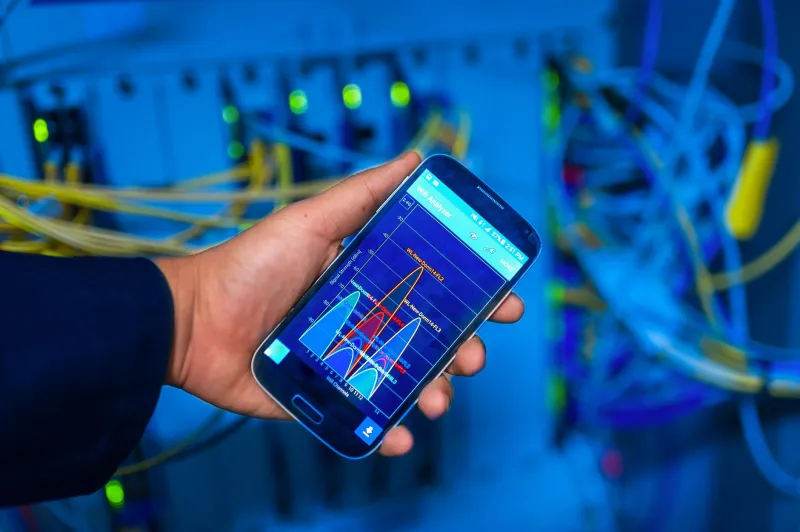
If you want to sidestep the guesswork entirely, here's a practical approach. Before buying anything, download a free app like NetSpot or WiFi Analyzer and walk your home with your phone. Map out where your current signal drops below -67 dBm — that's your dead zone boundary. Note the distance from your router and what's physically in the way (floors, exterior walls, appliances).
Now when you're evaluating extenders, you're not comparing abstract square footage numbers. You're asking: "Can this device reliably maintain a -65 dBm or better signal 30 feet from my router through two drywall partitions?" That's a question independent benchmarks can actually help you answer.
Most major retailers also offer 15–30 day return windows, so buying, testing in your specific environment, and returning if it doesn't deliver is a completely legitimate strategy. Don't let the box numbers talk you out of doing that test yourself.
The Bottom Line
The WiFi extender market is full of big numbers that mean very little in practice. Advertised range is measured in conditions that don't exist in your home. Throughput figures are theoretical maximums that real-world usage will never approach. And RSSI coverage claims often measure the edge of signal detection, not the edge of usable connectivity.
None of that means extenders are a bad solution — they're genuinely effective when you pick the right one for your specific situation. But the path to the right one runs through independent testing data, an understanding of your home's actual layout, and a healthy skepticism toward any number printed on packaging.
Shop the benchmarks, not the box. Your dead zones will thank you.